For freelancers and consultants
The hour you didn’t write down is the hour you don’t get paid for.
You bill by the hour or by the day, your day is interrupted twenty times, and the twenty-minute pieces between things never make it onto the invoice. Quarter Past asks what you’ve been doing every fifteen minutes, and one tap logs the quarter-hour that just went.
For Mac · 14 days free, then £54 once · Never reads your screen
How a billable day actually goes
Not one focused block. A client call inside a document inside an email thread, and a timer you started on Tuesday and stopped on Thursday.
You start on the proposal.
No timer to press. If you tap the task, the clock runs; if you don’t, nothing is lost.
It asks.
A small card by the menu bar: what have you been doing? Your projects are the choices. One tap, and 09:00 to 09:15 is on the record as the proposal.
The client rings.
You answer it, not the app. At 10:45 it asks again and you tap the client’s name. The call is logged from the last answer, not from when you remembered.
The day is already written.
Each entry says which project, how long, and whether it was measured live or recalled after the fact. Mark the billable ones. Export.
Built for the invoice, not instead of it
Quarter Past keeps the record. Whatever raises your invoices keeps doing that.
- Projects
- One per client or engagement. Tasks under each for the kinds of work you charge differently.
- Billable
- A tick on every entry. Untick the admin, the pitch that didn’t land, the lunch.
- Notes
- A line on any entry, so “Riverside, 1h 15m” becomes “Riverside, drainage revisions after site visit”.
- Export
- A CSV of every entry: date, project, task, note, start, end, duration in decimal hours, billable, and whether it was logged live or added later. Opens in Numbers, Excel or your invoicing tool.
- Interval
- Every 5, 10, 15, 20, 30 or 60 minutes, with quiet hours so it stops when you do.
- Fixing things
- Change a start time, add the call you took away from the desk, split a block, undo a delete.
You quoted three days. This says what it took.
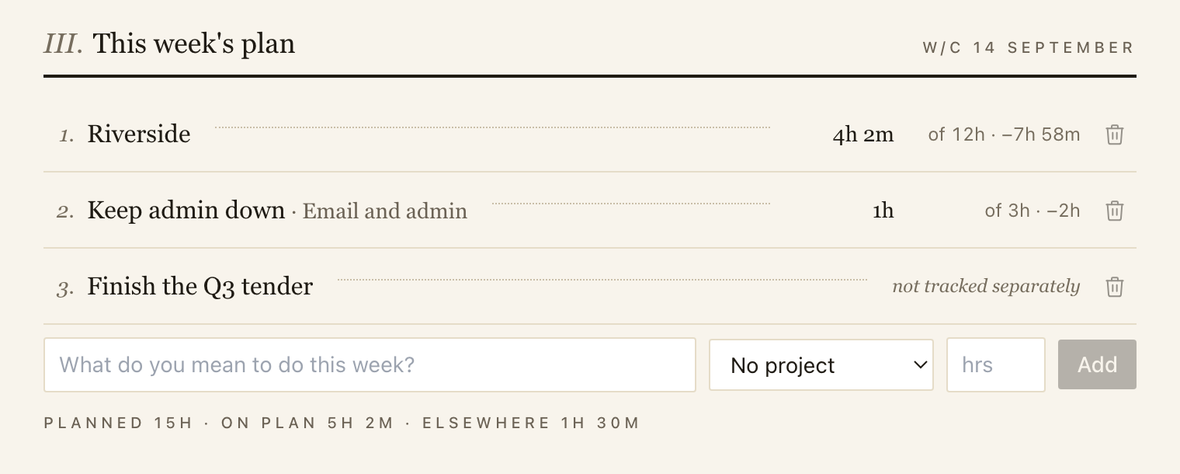
Write down at the start of the week what you mean to do and roughly how long. At the end, the app puts the record beside it and shows the difference. Nothing is scored, no streak is kept, and a line you never tracked says so instead of showing a zero. It is the quickest way to find out whether your day rate is your day rate.
Nothing about your clients leaves your Mac.
Automatic trackers work by reading your screen: document titles, web addresses, what was open when. Under an NDA that is a record you may not want to exist. Quarter Past has no screen-recording or accessibility permissions. It knows what you tapped and nothing else.
Works entirely offline
No account, no sync, no server. The train, the client site with no guest wifi, nothing changes.
Your record is a file you own
Readable, exportable and yours to back up, whatever happens to the app or the licence.
Honest about its own gaps
Every entry says whether it was measured live or recalled. Lunch stays a gap rather than being quietly filled in.
One unbilled hour costs more than the app.
£54, paid once, for one Mac. Fourteen days free first, with no card and no account. If it recovers a single hour on a single invoice, it has paid for itself; after that it is yours.
Version 2.3.10 · 7 MB · macOS 10.15 or later, Apple silicon and Intel · Checked by Apple